 Spiiin's blog
This is an AI-assisted English translation of the original post: dasSDL3 (Russian original).
I made SDL bindings for daslang.
- SDL3
- Automatic binding generation
- Idiomatic APIs
- Pipelines
- Builder
- Named initialization
- Return values and Result
- Early returns with sdl_try
- The same idea in other languages
- Resource lifetimes through blocks
- Events as a sequence
- Pattern matching on events
- Borrowed memory access
- Different types for different resources
- Arrays instead of pointers and counts
- Temporary state changes
- Partial results together with status
- Shader DSL
- Language and ecosystem integration
- Platforms and graphics backends
- Examples
SDL3#
SDL abstracts access to hardware and operating system facilities. Version 3 also introduced an abstraction over modern GPU APIs. You can still use SDL just to create a window and draw into it through another graphics API: DirectX, Metal, OpenGL, or Vulkan. There are also several companion libraries that extend SDL with image loading, higher-level audio and networking APIs, and simple 2D graphics.
I wanted this kind of Swiss Army knife for daslang, so I used AI to build bindings for all of SDL3’s functionality across several platforms.
Automatic binding generation#
The bindings are generated with dasClangBind, which works with a subset of C++. It parses the library’s code and generates basic bindings. These still need some polishing: removing helper macros and functions that do not belong in the bindings, and adapting idioms that do not translate well between languages, such as raw pointers and objects with different lifetimes or memory management rules. Getting working bindings is the first and easiest part of the job.
Idiomatic APIs#
The next layer is sdl_boost, a set of helpers on top of the basic bindings that makes the library easier to use and the code more expressive. Every language has its own idioms. Good bindings let you use library functions in forms that feel natural in the target language. The syntax macros in daslang are a great fit for this.
I used the Rust SDL3 bindings as a reference when designing the interface. I have already written about the Rust community’s approach to API design: Elegant APIs in Rust. Here I adapted those ideas to daslang.
Pipelines#
Pipelines are one of the features that make an interface convenient to use. See Pipelining might be my favorite programming language feature. In daslang, the |> operator makes value |> function(argument) equivalent to function(value, argument). The result of one call becomes the first argument of the next, so the code reads in execution order.
Builder#
You can build up an object description step by step. For example, set a window’s size, add a flag, and choose its position:
options gen2
require dassdl3/sdl3_window_boost

var settings = (window_options("dasSDL3", int2(800, 600))
    |> window_flags(SDL_WINDOW_HIGH_PIXEL_DENSITY)
    |> window_position(int2(SDL_WINDOWPOS_CENTERED, SDL_WINDOWPOS_CENTERED)))
window_options creates a WindowOptions, and each subsequent call returns an updated description. The window does not exist yet: you can prepare the settings separately and then pass them to with_window. Similar chains are available for textures, shaders, samplers, and graphics pipelines.
For example, here is a sampler description with linear filtering, interpolation between mip levels, and texture wrapping:
require dassdl3/sdl3_gpu_sampler_boost

var sampler_settings = (gpu_sampler()
    |> filters(SDL_GPUFilter.FILTER_LINEAR)
    |> mipmap_mode(SDL_GPUSamplerMipmapMode.SAMPLERMIPMAPMODE_LINEAR)
    |> address_modes(SDL_GPUSamplerAddressMode.SAMPLERADDRESSMODE_REPEAT))
filters sets the minification and magnification filters, mipmap_mode controls filtering between mip levels, and address_modes determines how coordinates outside the texture are handled. The result is an ordinary SDL_GPUSamplerCreateInfo, which you can pass to with_gpu_sampler(device, sampler_settings) to create a GPU resource with a defined lifetime.
These are ordinary free functions. You do not need to turn the description into a class with methods to get a chain of calls. The parentheses around the multiline expression allow continuation lines starting with |>.
Named initialization#
For short descriptions, it is convenient to specify the fields directly:
var settings = WindowOptions(title = "dasSDL3", size = int2(800, 600))
var rectangle = SDL_FRect(x = 20.0, y = 30.0, w = 160.0, h = 90.0)
A builder is useful when you assemble a description step by step; named initialization is useful when all the settings are known up front.
Return values and Result#
In C APIs, results are often written to parameters passed by pointer. The helper layer can return them as ordinary values. For example, window_size(window) returns a Result<int2, SdlError> containing either the window size or an error description. In daslang syntax, this type is written as $Result<int2; SdlError>.
Long type names can be shortened with typedef. For example, the library defines this type for operations without a meaningful success value:
typedef public SdlStatus = $Result<SdlUnit; SdlError>Function signatures can now use SdlStatus instead of the full type. SdlUnit represents an empty success value, and sdl_ok() creates that successful result. SdlError stores the operation name and the error message, copied before resources are released.
You can also introduce aliases for a specific task:
typedef WindowSizeResult = $Result<int2; SdlError>For results with different value types, the library provides the generic form $SdlResult<T>. For example, $SdlResult<int2> is the same type as $Result<int2; SdlError>. It is implemented by a type macro that supplies SdlError to the standard Result. These abbreviations give types convenient names while preserving their representation and behavior.
Option represents an absent value. For example, an SDL hint may not be set, in which case you can supply a fallback:
require dassdl3/sdl3_init_boost

let driver = hint_string("SDL_RENDER_DRIVER") |> unwrap_or("automatic")
The interface thus distinguishes an operation failure from the normal absence of a value.
Early returns with sdl_try#
When several operations return Result, you have to check for an error after each one. For example, let’s get the window size, print it, and clear the renderer. Without any helper syntax, the code looks like this:
require dassdl3/sdl3_window_boost

def print_size_and_clear(window : SDL_Window?; renderer : SDL_Renderer?) : SdlStatus {
    let size_result = window |> window_size()
    if (is_err(size_result)) {
        return err(unwrap_err(size_result), type<SdlUnit>)
    }
    let size = unwrap(size_result)
    print("{size.x} x {size.y}\n")

    var clear_result = renderer |> clear()
    if (is_err(clear_result)) {
        return <- clear_result
    }
    return sdl_ok()
}
window_size and the enclosing function return results with different success types: int2 and SdlUnit. If the first call fails, its SdlError must be placed into a result with the appropriate success type. For clear, the result can be returned directly.
With sdl_try, the same function becomes shorter:
require dassdl3/sdl3_window_boost
require dassdl3/sdl3_try

def print_size_and_clear(window : SDL_Window?; renderer : SDL_Renderer?) : SdlStatus {
    let size = window |> window_size() |> sdl_try
    print("{size.x} x {size.y}\n")
    renderer |> clear() |> sdl_try
    return sdl_ok()
}
sdl_try is a syntax macro: on success, it extracts the value; on failure, it returns early from the current function or block, preserving the SdlError. The checks from the first example are still there, but the macro generates them. The calls read as a sequence of actions, and error reporting can be left to the application boundary.
The enclosing function or block must return a Result whose error type is SdlError. sdl_try does not unwrap an Option or manage pointer lifetimes; resources use with_* scopes.
The same idea in other languages#
In daslang, the idiom is implemented at the library level: sdl_try generates checks and early returns through a syntax macro. Explicitly marking potential exit points seemed the most convenient approach to me: it shows where execution may end while keeping the code linear, without nested blocks or extra braces. Other languages have similar mechanisms for stopping a chain when a value is absent.
The examples below use a fictional SDL API: first we create a window, then a renderer for it. The creation functions return Option/Maybe; if either step produces no value, the remaining steps are skipped.
Rust: the ? operator extracts a value from Some, or returns None from the current function when it encounters None. The potential exit points are visible in the expressions:
fn create_window_and_renderer() -> Option<(Window, Renderer)> {
    let window = create_window("SDL", 800, 600)?; // Return None if the window was not created.
    let renderer = create_renderer(&window)?;    // Return None if the renderer was not created.
    Some((window, renderer))
}
Haskell: in a do block for Maybe, <- extracts a value from Just. On Nothing, the whole block evaluates to Nothing and the continuation is skipped. This behavior comes from binding computations for Maybe: the point where the chain stops lies “between the lines,” without a separate exit operator.
createWindowAndRenderer :: Maybe (Window, Renderer)
createWindowAndRenderer = do -- Inserts the logic "between the lines".
    window <- createWindow "SDL" 800 600
    -- On Nothing, skip the remaining steps; the block evaluates to Nothing.
    renderer <- createRenderer window
    -- On Nothing, skip the remaining steps; the block evaluates to Nothing.
    pure (window, renderer)
Resource lifetimes through blocks#
In C++, RAII is the usual approach to resource management: an owning object acquires a resource when constructed and releases it in its destructor when it leaves scope. This model of owning objects is less typical in daslang: explicit blocks and deferred cleanup through defer are convenient ways to define the lifetimes of external resources. The language has finalizers and inscope, but a pointer to an SDL object alone does not define its ownership or cleanup rules.
Creating a window or texture is only half the job: the resource must be released, including on an early return caused by an error. The with_* functions pass a resource to a block and release it when the block finishes. sdl_scope and sdl_use let you write several nested blocks as a linear sequence:
def draw_frame() : SdlStatus {
    return sdl_scope() {
        with_sdl(SDL_INIT_VIDEO) |> sdl_use
        let window : SDL_Window? = with_window(
            WindowOptions(title = "dasSDL3", size = int2(800, 600))) |> sdl_use
        let renderer : SDL_Renderer? = window |> with_renderer() |> sdl_use

        renderer |> clear() |> sdl_try
        renderer |> set_color(uint4(70u, 200u, 160u, 255u)) |> sdl_try
        renderer |> fill_rect(SDL_FRect(x = 20.0, y = 30.0, w = 160.0, h = 90.0)) |> sdl_try
        renderer |> present() |> sdl_try
        return sdl_ok()
    }
}
This example draws one frame; an application needs an event and rendering loop inside the resource lifetime. When the block ends, the renderer is released first, then the window, and finally SDL is shut down. If renderer creation or drawing fails, resources that have already been created are also released.
The sdl_use macro moves the rest of the block into the callback of the corresponding with_* function. The pointers remain borrowed: they can be used inside that scope, but must not be saved for later use or released manually. Resource lifetimes follow the structure of the program; no separate resource collector is needed.
For comparison, here is the same example without with_* and sdl_use (expand sdl_try as well, and it looks almost like C). Each resource is created before entering its cleanup block. defer is moved to the finalization section of its entire block, so placing it after resource creation in the same block is not enough: cleanup could also run on an early return before creation succeeds.
def draw_frame_manual() : SdlStatus {
    sdl_init(SDL_INIT_VIDEO) |> sdl_try
    {
        defer() { SDL_Quit() }

        let window = create_window("dasSDL3", 800, 600) |> sdl_try
        {
            defer() { destroy_window(window) }

            let renderer = window |> create_renderer() |> sdl_try
            {
                //Hadouken!!!
                defer() { destroy_renderer(renderer) }
                renderer |> clear() |> sdl_try
                renderer |> set_color(uint4(70u, 200u, 160u, 255u)) |> sdl_try
                renderer |> fill_rect(SDL_FRect(x = 20.0, y = 30.0, w = 160.0, h = 90.0)) |> sdl_try
                renderer |> present() |> sdl_try
                return sdl_ok()
            }
        }
    }
}
If renderer creation fails, the window and SDL are cleaned up. If drawing fails, all three resources are released in reverse order. with_* encapsulates these blocks and cleanup rules, while sdl_use lets you use them without writing the nesting by hand.
Events as a sequence#
You can process the event queue with an ordinary loop:
require dassdl3/sdl3_events

def close_requested(window : SDL_Window?) : bool {
    for (event in poll_events()) {
        if (should_close(event, window)) {
            return true
        }
    }
    return false
}
poll_events() is a lazy iterator: it retrieves one event at a time and stops when the queue is empty. If you leave the loop early, subsequent events remain queued. Instead of a raw SDL_Event containing a C union, the code receives an SdlEvent, a variant type containing decoded event data. Strings and lists in that data belong to the resulting value, so the next poll will not overwrite them.
Pattern matching on events#
The SdlEvent variant type can be inspected with match. Each branch receives the data for its corresponding event:
require dassdl3/sdl3_events
require daslib/match

def print_events() {
    for (event in poll_events()) {
        match (event) {
            if (SdlEvent(key_down = $v(key))) {
                print("Key: {key.scancode}, repeat: {key.repeat}\n")
            }
            if (SdlEvent(mouse_motion = $v(mouse))) {
                print("Mouse: {mouse.position}\n")
            }
            if (SdlEvent(text_input = $v(input))) {
                print("Text: {input.text}\n")
            }
            if (_) { }
        }
    }
}
Borrowed memory access#
Pixel operations use another form of the same block idiom: the library temporarily provides access to texture memory. For example, let’s fill a 32 × 32 RGBA32 streaming texture with a gradient:
require dassdl3/sdl3_pixel_views

def paint_gradient(texture : SDL_Texture?) : SdlStatus {
    return with_texture_pixels_rgba8(texture, SDL_Rect(w = 32, h = 32)) $(pixels) {
        for (y in 0 .. pixels.height) {
            pixels |> with_row(y) $(var row : array<uint>#) {
                for (x in 0 .. length(row)) {
                    row[x] = rgba8(uint(x * 8), uint(y * 8), 180u, 255u)
                }
                return sdl_ok()
            } |> sdl_try
        }
        return sdl_ok()
    }
}
with_texture_pixels_rgba8 locks the texture while its block runs, and with_row provides a borrowed array of pixels from one row. Here, # marks temporary borrowed access: this data cannot be retained or passed out of the block. rgba8 packs the components into a single uint. The code operates directly on texture memory, while the library accounts for row pitch and unlocks the texture when the block finishes, including on an error return. The wrapper also defines the data type, avoiding unsafe access through void* pointers.
Different types for different resources#
An ordinary typedef shortens a type name without separating it from the original type. The checked GPU API needs genuinely different types: buffers, textures, and samplers must not accidentally replace each other. Their handles are therefore registered as distinct types. Their definitions are equivalent to the following; you should not redeclare them in your script:
typedef distinct GpuBufferHandle = uint64
typedef distinct GpuTextureHandle = uint64
typedef distinct GpuSamplerHandle = uint64
All three have the same machine representation, but the compiler treats them as different types. For example, vertex binding takes an array specifically of GpuBufferHandle:
require dassdl3/sdl3_gpu_recording_boost

def bind_vertices(device : SDL_GPUDevice?; pass1 : GpuRenderPassHandle;
                  buffer : GpuBufferHandle) : SdlStatus {
    var buffers <- array<GpuBufferHandle>(buffer)
    var offsets <- array<uint>(0u)
    return gpu_bind_vertex_buffers(device, pass1, 0u, buffers, offsets)
}
Passing a GpuTextureHandle in place of buffer is a compile-time error. At runtime, the checked API also validates the resource kind, whether it still exists, and which device it belongs to. A copied handle remains an alias to the same resource: it does not create separate ownership or extend its lifetime. These checks apply to the checked GPU API; direct SDL calls using native pointers retain their original contracts.
Arrays instead of pointers and counts#
Many C functions accept a data pointer and a separate element count. An array is more convenient for scripts because its size is already known. For example, let’s draw a triangle:
require dassdl3/sdl3_geometry_boost
require dassdl3/sdl3_try

def draw_triangle(renderer : SDL_Renderer?) : SdlStatus {
    var vertices <- array(
        vertex(float2(100.0, 20.0), float4(1.0, 0.0, 0.0, 1.0)),
        vertex(float2(180.0, 160.0), float4(0.0, 1.0, 0.0, 1.0)),
        vertex(float2(20.0, 160.0), float4(0.0, 0.0, 1.0, 1.0)))
    var indices <- array<int>(0, 1, 2)
    renderer |> draw_geometry(vertices, indices) |> sdl_try
    return sdl_ok()
}
The adapter passes the pointers and counts to SDL itself. Before the call, it checks index bounds, supported array sizes, and vertex values.
Temporary state changes#
A block can also define how long a setting applies. For example, with_render_target saves the current render target, switches to a texture, and restores the previous target when the block finishes:
require dassdl3/sdl3_pixels_boost
require dassdl3/sdl3_scope

def draw_to_texture(renderer : SDL_Renderer?) : SdlStatus {
    return sdl_scope() {
        let texture : SDL_Texture? = renderer |> with_target_texture(256, 256) |> sdl_use
        with_render_target(renderer, texture) {
            renderer |> clear(uint4(30u, 60u, 90u, 255u)) |> sdl_try
            return sdl_ok()
        } |> sdl_try

        // The previous render target has already been restored.
        renderer |> draw_texture(texture) |> sdl_try
        return sdl_ok()
    }
}
Partial results together with status#
For IO, a Result<array<uint8>, SdlError> may be insufficient: an operation might transfer some data and then fail. Therefore, read_io and write_io return IoTransfer, which stores the transferred byte count separately from the status:
require dassdl3/sdl3_iostream_boost
require dassdl3/sdl3_try

def read_chunk(stream : SDL_IOStream?) : SdlStatus {
    var bytes : array<uint8>
    resize(bytes, 4096)
    let transfer = stream |> read_io(bytes, 4096ul)
    print("Read: {transfer.transferred} bytes\n")
    let status = transfer.status |> sdl_try
    print("Status: {status}\n")
    return sdl_ok()
}
transferred is available even when status contains an error.
Shader DSL#
Another feature is writing shaders in daslang. This uses the existing dasSpirv compiler: annotations mark shader functions, and the compiler generates SPIR-V and reflection metadata while compiling the script. The SDL layer uses those results to create GPU resources.
The chain looks like this: annotated function → SPIR-V and reflection → resource layout validation → SDL GPU shader creation. The shader is compiled when the script is compiled, while the GPU object is created at runtime, once a device is available.
Describing a shader#
For example, here is a fragment shader that reads its color from a uniform block:
options gen2
require spirv/spirv_shader
require spirv/spirv_builtins

struct Tint { color : float4 }
var @uniform @set = 3 @binding = 0 tint : Tint
var @out @location = 0 output_color : float4

[fragment_shader(name = "solid_fragment")]
def fragment_main {
    output_color = tint.color
}
@uniform describes data supplied to the shader by the application, while @out describes its output.
The annotation produces two arrays: solid_fragment : array<uint> containing SPIR-V and solid_fragment_reflect : array<uint> containing reflection. Reflection describes the shader stage and the resources it uses. The source function is named fragment_main, but the generated SPIR-V entry point is named main.
Creating an SDL GPU shader#
Once a device is available, both arrays are passed to with_gpu_dsl_shader. This fragment uses the definitions from the previous example:
require dassdl3/sdl3_shader_dsl
require dassdl3/sdl3_scope

def inspect_shader(device : SDL_GPUDevice?) : SdlStatus {
    return sdl_scope() {
        var shader : SDL_GPUShader? = device |> with_gpu_dsl_shader(solid_fragment, solid_fragment_reflect) |> sdl_use
        print("Fragment shader created\n")
        return sdl_ok()
    }
}
The wrapper reads reflection, validates the resources against SDL conventions, and fills in SDL_GPUShaderCreateInfo: the stage and the number of uniform blocks and samplers. SPIR-V is converted from an array of words to an array of bytes and passed to the regular shader creation function. The resulting object’s lifetime is managed by the familiar with_* scope.
Code and reflection must come from the same compilation. Reflection helps fill in creation parameters, but the application still controls compatibility between vertex and fragment shaders, data formats, and graphics pipeline configuration.
You can also use precompiled shaders, skipping the compilation stage.
Passing uniform structures#
The Tint structure can also be used on the application side. However, its ordinary memory representation cannot be uploaded directly: the GPU expects std140 layout. A packing adapter handles this:
require dassdl3/sdl3_shader_uniforms
require dassdl3/sdl3_try

def set_tint(command : SDL_GPUCommandBuffer?) : SdlStatus {
    let params = Tint(color = float4(0.25, 0.5, 0.75, 1.0))
    command |> push_gpu_dsl_fragment_uniform(0u, params) |> sdl_try
    return sdl_ok()
}
The application’s structure must match the shader declaration: the wrapper does not determine the active shader from the command buffer. To pack repeatedly without allocating a new temporary buffer, use pack_gpu_dsl_uniform with a reusable byte array.
Compute and graphics backends#
The same mechanism works for compute shaders: [compute_shader] generates SPIR-V and reflection, and with_gpu_dsl_compute_pipeline creates an SDL compute pipeline, deriving workgroup dimensions and resource counts from reflection. For storage resources, the additional sdl_shader_access annotation records read and write access modes, while std430 adapters pack arrays of structures into storage buffers.
The direct SPIR-V path is used for Vulkan. D3D12 has a separate SDL_shadercross integration: with_gpu_dsl_shader_cross and with_gpu_dsl_compute_pipeline_cross translate the same SPIR-V into the format required by the backend. This path requires shadercross and the corresponding compiler dependencies.
Articles about shaders in SDL:
https://moonside.games/posts/introducing-sdl-shadercross/
https://moonside.games/posts/layers-all-the-way-down/
Language and ecosystem integration#
JIT/AOT#
daslang is more than a scripting language. On supported platforms, its JIT compilation modes often make interpreted code several times faster. Where JIT is unavailable, it can transpile code to C++. This is also supported and covered by tests to prevent regressions.
Live mode#
The language also supports live reload. You can start an application with an empty window and keep adding functionality without restarting it. The mechanism is described in Running it live.
In the SDL examples, the window, renderer, and ImGui context belong to the native host and survive script reloads. The live_watch_boost module watches for file changes and requests a reload after a save. Values annotated with @live are restored during incremental reloads; a full reload resets the script’s state.
Examples on GitHub:
- 01_widgets.das — an SDL/ImGui application with automatic reload and control through stdin/stdout.
- 02_widgets_http.das — the same application controlled through a local HTTP API, with support for connecting an MCP client.
- 03_widgets_recording.das — a version that records frames to APNG.
A minimal live interface fragment:
require dassdl3/sdl3_imgui_widgets
require dassdl3/sdl3_boost
require dassdl3/sdl3_try
require sdl3_live_demo
require live/live_vars
require live/live_watch_boost

var @live edits = 0

def frame() : SdlStatus {
    let renderer = demo_renderer()
    imgui_widgets_new_frame()
    window(MAIN, (text = "SDL live widgets", closable = false,
                  flags = ImGuiWindowFlags.None)) {
        button(INCREMENT.PUBLIC, (text = "Increment"))
        if (INCREMENT.clicked) { edits++ }
        text("Edits: {edits}")
    }
    renderer |> clear() |> sdl_try
    imgui_widgets_render(renderer)
    renderer |> present() |> sdl_try
    return sdl_ok()
}
Tests and automated tutorials#
UI automation integrates with imgui_playwright from daslang. It provides a scripting API for ImGui applications: widgets are addressed by names such as MAIN/INCREMENT, and you can take snapshots, click or drag, wait for a value to change, and request a reload.
For example, after connecting app to the HTTP example, you can check that a click worked and its result survived a reload:
var snap = wait_for_render(app, "MAIN/INCREMENT", 10.0)
let clicks = widget_payload_field(snap, "MAIN/INCREMENT", "click_count") ?? 0

post_command(app, "set_user_control", JV((enabled = false)))
click(app, "MAIN/INCREMENT")
verify(wait_for_int_value(app, "MAIN/INCREMENT", "click_count", clicks + 1))

reload(app)
verify(wait_for_render(app, "MAIN/INCREMENT", 10.0) != null)
verify(wait_for_int_value(app, "MAIN/INCREMENT", "click_count", clicks + 1))
post_command(app, "set_user_control", JV((enabled = true)))
The complete playwright_widgets.das also drags a slider through synthetic mouse events and checks its value after a reload. The automated test additionally compares UI pixels to verify changes in rendering.
The same scenario can record a demonstration or tutorial. record_widgets.das runs a sequence of actions inside with_recording_app: it pauses, moves a slider, clicks a button, and checks the result. The application captures frames through SDL, and dasStbImage writes them to APNG. On Windows, the build with recording support can be launched with one command from the repository root:
.\examples\live\record.cmdThis makes tutorial actions reproducible after UI changes. The scenario both describes the demonstration and checks that its actions produce the expected results. AI agents are good at using this interface.
daspkg integration#
The library can be installed as a ready-to-use package through daspkg, without generating bindings or building it yourself. The source distribution also includes generated bindings, so you do not need to bring in LLVM and Clang.
Platforms and graphics backends#
The library has separate profiles for Windows, Linux, macOS, and the browser. Shared boost modules sit on top of bindings that account for each platform’s ABI and available functions.
| Platform | Supported features |
|---|---|
| Windows x64 | Native MSVC build, interpreter and AOT; GPU examples for Vulkan and Direct3D 12. |
| Linux | Core profile with GCC, interpreter and strict AOT; 2D examples on Ubuntu/WSL2 through WSLg. GPU rendering requires a working Vulkan device. |
| macOS | Native Apple Clang build, Cocoa/Metal, interpreter and strict AOT; Metal tests include rendering and readback. |
| Browser | Emscripten build targeting WebAssembly: SDL Renderer through WebGL, input and audio. There is also a separate standalone wasm32 AOT example. |
Graphics uses two paths. SDL_Renderer provides ready-made 2D operations for textures, rectangles, and geometry. SDL_GPU gives you control over shaders, buffers, graphics pipelines, and compute pipelines. The browser profile uses Renderer/WebGL; the native SDL GPU examples have not yet been ported to it, and the pinned SDL version has no WebGPU backend.
Shader format also matters for SDL GPU. Vulkan accepts SPIR-V, Direct3D 12 accepts DXIL, and Metal accepts MSL or Metallib. In the GPU examples, a single daslang source is compiled to SPIR-V: Vulkan uses it directly, while Direct3D 12 and Metal use SDL_shadercross. The Direct3D 12 path also needs DXC. You can also supply precompiled shaders in the appropriate format.
The backend can be selected through SDL_GPU_DRIVER: vulkan, direct3d12, or metal.
SDL can also be used with the separate Vulkan and OpenGL bindings available in daslang through dasVulkan and dasOpenGL. SDL then handles the window, input, and platform integration, while the application calls the graphics API directly.
For OpenGL, create a window with SDL_WINDOW_OPENGL and a context through with_gl_context. Once the context is current, you can use require opengl and ordinary glViewport, glClear, drawing, and resource upload calls. Present the frame with SDL_GL_SwapWindow. There is a context creation example and dasOpenGL rendering examples, which use OpenGL ES/WebGL 2 in the browser.
For Vulkan, SDL creates a window with SDL_WINDOW_VULKAN, reports the required instance extensions through vulkan_instance_extensions, and creates a window surface through with_vulkan_surface. The instance itself is created through Vulkan with those extensions enabled; devices, queues, swapchains, and rendering commands also remain the responsibility of Vulkan code. dasVulkan provides access to this API from daslang, while the SDL wrapper handles the platform-specific window and surface work. The extension query example and Vulkan interop contracts illustrate this boundary. This path requires a Vulkan module or a custom native host; the standard SDL runner does not include it by itself.
Portability is checked through tests and GitHub CI for Windows, Linux, and macOS. Build, API, and AOT checks are supplemented by separate graphics and browser test runs. Otherwise, updating or adding features would become a nightmare.
Examples#
To test the API, I ported several BGFX examples; they also make a useful performance reference:
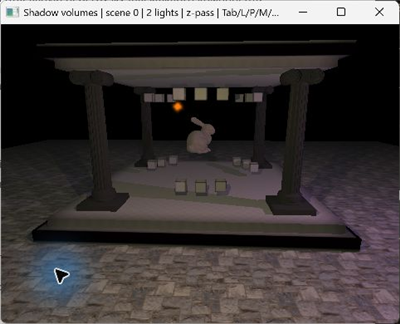
bgfx examples ported to daslang and SDL GPU. The shaders in these examples are also written in daslang.
The latest port is Shadow volumes: a scene with shadow volumes and several light sources. Here is a screenshot of the example running on the Vulkan backend:
For the web version, I also made an NES emulator that runs in the browser:
https://github.com/spiiin/dasNES
https://spiiin.github.io/dasNES/